Research from OpenView shows that companies with a strong product-led growth (PLG) strategy grow revenue at about twice the pace of traditional sales‑led peers. That sounds exciting, until signups start coming in and most of those users never reach real value.
When your product demo PLG strategy is weak, the funnel quietly leaks money.
One PLG practitioner sums it up with a simple line that appears often in writing from groups like ProductLed and OpenView:
That is exactly what a modern product demo has to deliver. Buyers expect to understand a complex SaaS product in minutes, without hopping on a call or sitting through a stiff slide deck.
In this article, you will see:
- What PLG really demands from a demo
- How the three main demo types map to different PLG funnels
- How to design a demo that cuts Time to Value
- How to place your demo across the full funnel
- How to measure whether your demo is working
What PLG Actually Demands From Your Product Demo
In a classic sales‑led motion, the demo happens late and lives with the sales team. In a PLG motion, the demo sits right at the front door. It must greet visitors, explain the product, handle objections, and push the right people to act, all without a human in the room.
The basic PLG contract is simple. People want to feel value before they commit. That means your product demo PLG strategy has to put real outcomes on screen fast.
If a prospect does not hit an Aha moment in the first few minutes, they will click to a competitor and compare several tools on their own.
In this context, the demo has three jobs at the same time:
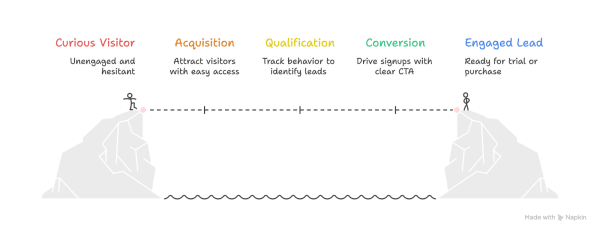
Many SaaS teams still treat the demo as an afterthought, a polished screen tour that mirrors a sales deck. That approach fails hard when your product is technical and your buyers are sharp.
Complex workflows, deep integrations, and busy dashboards need a demo that explains without dumbing things down.
For a product-led growth strategy, an effective demo has a few non‑negotiable traits:
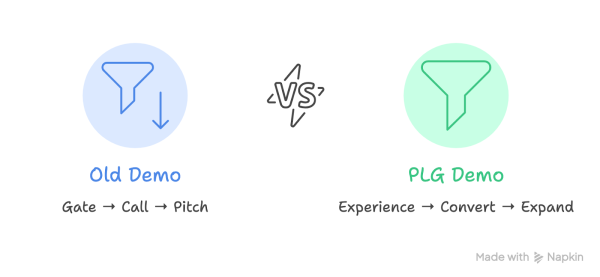
- It delivers instant value by showing outcomes first, not menus and settings. Instead of walking through every button, it starts with a finished report, a clean dashboard, or an automation that saves time.
- It collects personalization signals so later messages and in‑app flows feel relevant. Simple questions about role or use case at the start of the demo help route viewers through the most important path.
- It produces measurable engagement data that your team can act on. When you can see where people drop off, which features they replay, and which flows send them to the signup page, your PLG funnel optimization stops being guesswork.
- It supports self-serve navigation for different learning styles. Some viewers want to sit back and watch. Others want to click through screens. A modern demo lets both types move at their own speed while still guiding them to the high‑value moments.
The Three Types Of Product Demos And Which PLG Funnel They Serve
Not every product demo fits every motion. A pure self‑serve tool, a mid‑market platform, and an enterprise platform need different demo formats. To align your product demo PLG strategy, you can think in three buckets and match each one to the right funnel.
Interactive Product Demos For A Self-Serve Motion
An interactive product demo is a click‑through replica of your software that runs in a safe, sandboxed space. It looks and feels like the real UI but uses dummy data, so visitors can explore without any setup. They can test flows, open menus, and see sample dashboards that mirror real use.
This format shines when you sell to individual users or small teams with a low entry price. Often those products already use a fre.emium or fre.e tria.l model.
The interactive demo becomes the first taste on the website, sitting above the signup. It works all day, gathers email addresses after delivering value, and tracks every click so your team sees which features grab attention.
For more complex SaaS, an interactive demo works best when paired with a short video that sets context. The video shows the story and high‑level outcome, while the interactive layer lets people poke around safely.
Together they give you both clarity and hands‑on proof, which is the sweet spot for a self‑serve product-led growth strategy.
Product Demo Videos For A Sales-Assisted Or Enterprise Motion
Product Demo videos are structured walkthroughs that feel like a live presales call, but without a calendar invite.
A strong demo video guides the viewer through the main problem, key workflows, and proof of value in a tight narrative. It combines UI capture, motion graphics, and clear voiceover to answer the questions a good sales engineer would cover.
This format is ideal when your product is complex, the buying group is large, or security rules block open tri.als. In those cases, decision makers want to see how the product fits their world before they share data or invite IT.
Demo videos scale that education so your presales team does not repeat the same overview call ten times a day.
Modern demo videos can branch based on role or use case, and they track view time, replays, and hot spots. That demolytics data arms your sales team before a live meeting, so they know which feature caught the CTO’s eye and which others never landed.
The Hybrid Demo Experience For The Middle Market
The hybrid demo blends guided explanation with hands-on exploration. Think of a short video or animated overlay that appears inside a live or simulated UI.
The viewer can click around, but they are never left alone in a maze of menus, and they do not need to follow every single step.
This style works well for mid‑market SaaS where a small team adopts first, then spreads the tool across the company.
The starting demo should feel low friction so that a manager or lead user can test the product without help. Later, focused mini demos can showcase premium features or add‑ons that make upgrades an easy internal sell.
Hybrid demos are also practical from an operations view. Marketing and product teams can update copy, flows, or screens without rebuilding everything from scratch.
That makes it easier for you to test different hooks, value stories, and PLG onboarding experience ideas, and see which one boosts activation and expansion the most.
How To Build A Demo That Cuts Your Time To Value
Time to Value is the gap between a first touch and the moment a user feels real benefit. In a PLG motion, that number decides whether someone becomes an active user or a quiet churn statistic. Your demo is the first and best tool you have to shrink this gap.
When you design a demo with Time to Value in mind, every second counts. You stop giving full menu tours and start telling a clear story.
The goal is simple: help a new viewer think this product solves my problem within minutes, then give them a direct path into tri.al or signup.
Here are four practical tactics that support that goal:
- Use pre‑filled templates and dummy data so people never start from a blank screen. Show a real‑looking project, dashboard, or workflow that matches a common use case in their role. Viewers can then see inputs and outputs side by side, which makes it much easier to connect features with outcomes.
- Lead with the outcome instead of diving into controls and settings. Open the demo on the finished report, smooth workflow, or time saved, then briefly rewind to show how it came together. This order mirrors how buyers think, because they care first about results and only later about how the product does the work under the hood.
- Personalize the entry point with one or two simple questions before the demo begins. Asking about a role, industry, or main job to be done gives you just enough information to route users into the most relevant path. When a marketing lead sees campaigns and a finance lead sees forecasts, both feel understood and stay engaged longer.
- Remove every extra step that does not pull the viewer toward an Aha moment. That can mean cutting long intros, trimming dead screens, or reducing form fields before someone can watch or click. A quick audit with your team, based on viewing data, often reveals several places where you can save ten or twenty seconds and keep far more people with you.
For complex SaaS products, this can be hard to do alone. There is often a big gap between how insiders talk about the product and how new users understand it.
Embedding Your Demo Into The Full PLG Funnel
Most SaaS sites hide their best demo behind a single Watch The Demo button on the homepage. That wastes a huge amount of potential. In a strong product-led growth strategy, your demo appears at many points across the funnel, not just at the start.
Think about the full flow from first click to expansion. A visitor might see a demo on a landing page, then a different one inside the product, and a short feature teaser months later when a new module launches.
Each of those touchpoints strengthens habits, sets expectations, and supports your PLG funnel optimization work.
Here are four key places where your demo should live:
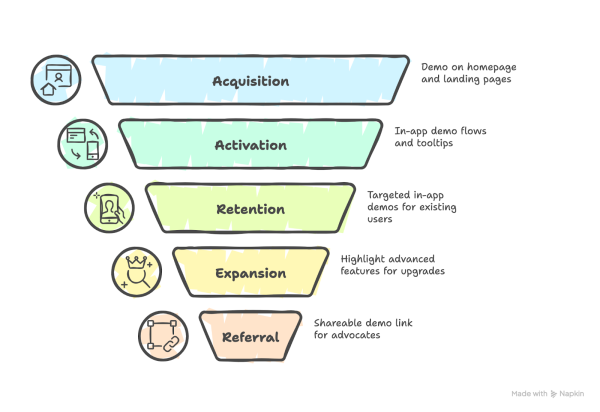
Across all these touchpoints, demo engagement data can feed your Product Qualified Lead scoring. Time in demo, features viewed, and flows completed say much more about real intent than a single page view.
To make this system work, you need not just one hero demo but a small library of focused videos and experiences.
Measuring Whether Your Demo Is Actually Driving PLG Growth
If you cannot measure the impact of your demo, you are flying blind. Gut feelings from the sales team or a few positive comments on LinkedIn do not tell you whether your product demo PLG strategy really moves the numbers that matter.
Start by deciding which metrics belong to which part of the funnel. That way you can see where the demo works and where it needs work. It also helps your team avoid blaming the product when the real issue sits in the signup flow or pricing page.
From there, you can focus on three tight metric groups:
- Track demo-to-tr.ial/demo-to-paid conversion, Time to Value, and CAC for acquisition.
- Measure engagement through features explored, key steps completed, and PQL growth.
- Link demo activity to tr.ial-to-paid conversion, expansion revenue, and lifetime value for retention.
As many operators like to say, “What gets measured tends to improve.”
Keep in mind that not every viewer who loves your demo will buy, and a few light viewers may still convert for other reasons. Data should inform your decisions, not dictate your entire roadmap.
The best SaaS teams treat the demo as a living asset, running A/B tests, refreshing scripts as the product changes, and revisiting the story whenever engagement dips.
Conclusion
In a product‑led world, your demo is far more than a sales aid. It is the front door, the tour guide, and often the main closet for your SaaS product.
When your product demo PLG strategy is sharp, the demo attracts the right users, helps them hit value fast, and feeds clean intent data into the rest of your growth system.
Designing that kind of demo is not easy, especially when your product is technical, your buyer group is large, and your team is busy shipping features.
You need a story that makes sense to both founders and engineers, visuals that simplify without losing power, and a clear map of how each demo supports your product-led growth strategy across the funnel.
Ready to build a product demo that actually powers your PLG funnel and supports your next stage of growth?
Reach out to What a Story and start planning a demo experience that works as hard as your product.